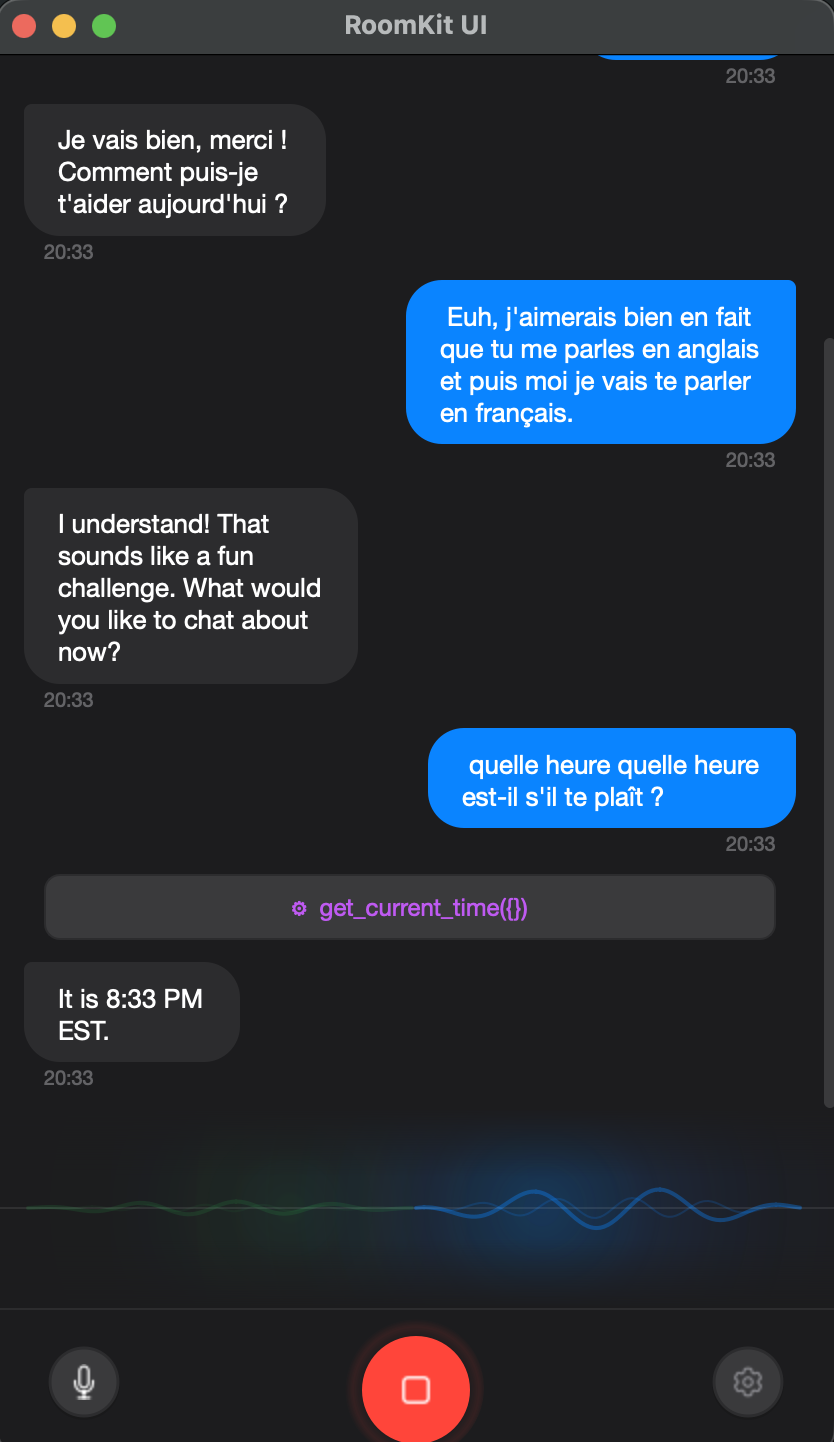
A native desktop app for real-time voice conversations with AI. Google Gemini, OpenAI, Anthropic Claude, or local models — switch with one click. Built on RoomKit.
uv run python -m roomkit_ui
A complete voice assistant experience with professional-grade audio processing.
Full-duplex voice conversations with sub-second latency. Speak naturally with interruption support.
iMessage-style chat bubbles with streaming partial transcriptions. See every word as it's spoken.
Ambient glow visualization showing mic and speaker audio levels with smooth animated waveforms.
Built-in WebRTC and Speex AEC for hands-free conversations without feedback loops.
Choose your microphone and speaker from settings. Supports all system audio devices.
Optional RNNoise denoiser removes background noise for crystal-clear voice input.
Press a global hotkey to dictate anywhere. Transcription is pasted into the focused app automatically.
Connect external tools via Model Context Protocol. Stdio, SSE, and HTTP transports supported.
Dictation in 14+ languages including English, French, Spanish, German, Japanese, Chinese, and more.
Apple-inspired dark and light mode. Switch instantly from settings with full theme-aware components.
AI responses render with full markdown — code blocks, tables, links, and inline formatting.
Speech-to-Speech (realtime) or Voice Channel (STT → LLM → TTS). Choose per provider.
Piper, Qwen3-TTS (voice clone), NeuTTS (voice clone). Fully offline text-to-speech.
Whisper, Parakeet, Zipformer via sherpa-onnx. Download models from settings.
Render HTML UIs from MCP servers inline in the chat. Interactive tool results, not just text.
Browse and install skills from CLabHub. Extend your assistant without writing code.
CUDA (NVIDIA) or CoreML (Apple) for local models. Hardware-accelerated inference.
Switch between providers instantly. Your API keys are saved independently.
Native audio with Gemini 2.5 Flash. Low latency, multilingual, with built-in thinking.
GPT-4o Realtime API with server-side VAD. Natural, expressive voices in real time.
Claude with STT/TTS voice channel mode. Powerful reasoning with natural voice.
vLLM, Ollama. No API key needed, fully offline. Run models on your own hardware.
Pre-built binaries for every major operating system. Or run from source with one command.
git clone https://github.com/roomkit-live/roomkit-ui.git
cd roomkit-ui && uv sync
uv run python -m roomkit_ui
Open Settings, choose your provider (Gemini, OpenAI, Claude, or local), paste your API key, and start talking.
Download RoomKit UI or build from source. It's open-source and free.